AI training companionBeta

The coach that shows its work.

Liftoday plans every gym or home session from what you lifted, what each muscle did in the last 72 hours and how you feel today. Every choice comes with its reason.

  • 528 exercises
  • 272 AI demos
  • 3 setups
  • 0 accounts needed
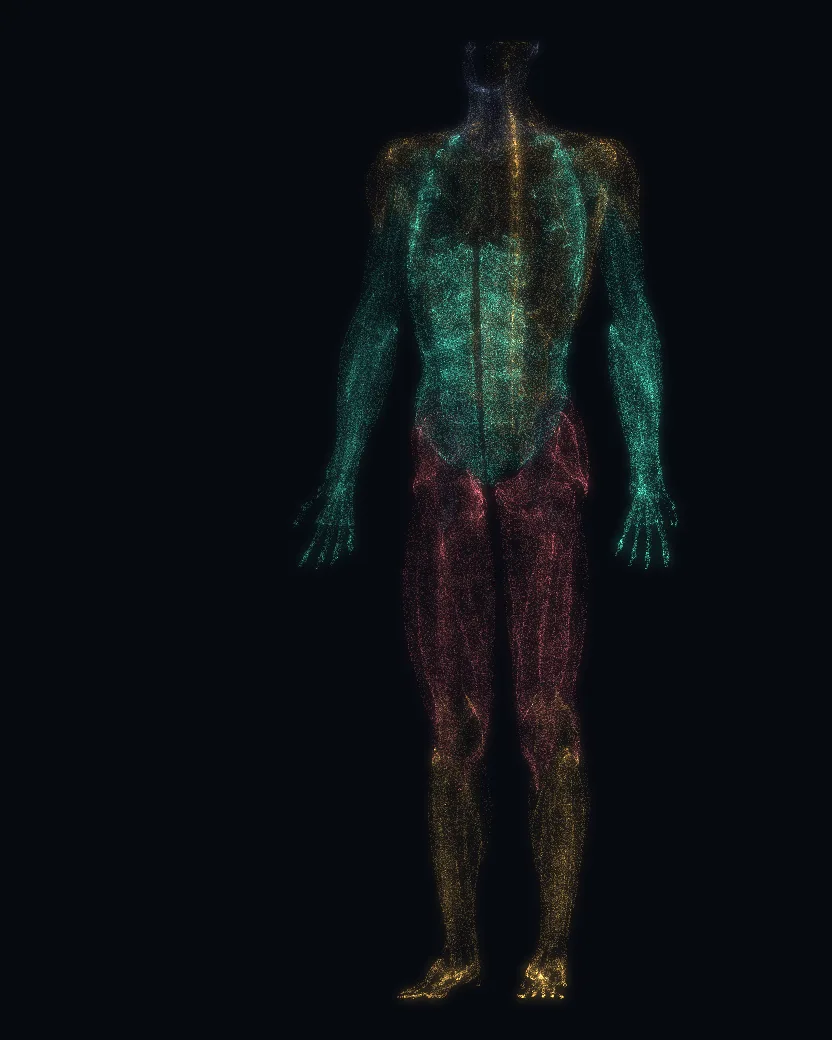
A human figure drawn in points of light. The legs glow coral (heavy), calves and shoulders amber (worked), the rest mint (fresh).

Scan last 72 h · Thu 18:00 · sample athlete

  1. Quads5 sets yesterdayHeavy
  2. Hamstrings8 sets yesterdayHeavy
  3. Glutes & hips8 sets yesterdayHeavy
  4. Shoulders13 sets 3 days agoWorked
  5. Chest6 sets 3 days agoFresh
FreshWorkedHeavySore

How it works5 steps

From your log to today’s session.

Each step below runs on Liftoday’s own rules and the app’s real catalog. Change the inputs and watch the output change.

01 Logset by set

Log a set with one tap.

Weight and reps come prefilled from your plan. Change them if you need to, then tap Complete. After the last set Liftoday asks one question: how many more reps could you have done? That answer, your reps in reserve, is what the engine learns from.

  • Prefilled from the plan, with last time’s numbers beside it
  • Rest timer with an alert when it’s time
  • One question after the last set: reps left (RIR)
  • Every demo shows the working muscles

Barbell back squat · set 2 of 3

80 kg × 8 prefilled · last time 80 kg × 7 · rest 2:30

Thursday 18:00 · last 72 hours

  • Quads: 5 sets yesterday, heavy
  • Hamstrings: 8 sets yesterday, heavy
  • Glutes & hips: 8 sets yesterday, heavy
  • Shoulders: 13 sets 3 days ago, worked
  • Back: 7 sets 3 days ago, worked
  • Chest: 6 sets 3 days ago, fresh

02 Read72 hour window

It counts what each muscle did.

Every working set counts for the muscles it trains: in full for the main ones, half for the helpers. A set fades to half after a day, a quarter after two, and drops out after 72 hours. Liftoday shows you the count, like “chest · 6 sets 3 days ago”. It never guesses a recovery percentage.

  • main muscle 1.0 · helper 0.5
  • < 24 h ×1 · 24–48 h ×½ · 48–72 h ×¼
  • worked ≥ 1.5 · heavy ≥ 3.0
  • Mark a muscle sore and Liftoday works around it for 48 hours
  • Gym and home share one history, because it’s one body

03 Composetoday’s session

Today follows from the last few days.

Your program rotates through its sessions. When at least half the muscles of the next one were trained hard or are sore, and another session is clearly fresher, Liftoday offers that one instead and says why. The planned one is always a tap away.

  • Keeps the rotation unless half its muscles are loaded
  • Switches only to a session under a quarter loaded
  • Every switch comes with its reason
  • Short on time or low on energy? The planner adjusts the details

Why today

Upper A

  • Upper A today — quads, hamstrings and glutes & hips were trained yesterday
  • Lower B was next in your rotation

Validator · 6 checks

  • Every exercise exists in the catalog
  • Your equipment covers it
  • No exercise twice
  • At most one weight step up
  • No heavy sets on a sore muscle
  • Fits your time

04 Guardevery plan, checked

Rules check every plan before you see it.

The AI planner proposes the details: exercises, sets, weights and order. A validator on your phone checks each one against hard limits. Anything out of bounds is replaced with the rules engine’s answer, and the plan says what changed. With no connection, the rules engine plans on its own.

  • Planner proposes, rules decide what reaches you
  • A second model scores each plan for balance and progress
  • Offline? The rules engine runs the app by itself

AI planner · in development

05 Progressreps first, weight second

Progress you can read.

One good session earns a rep. Two qualifying sessions at the top of the range earn a weight step up to 5 %. A larger equipment step, up to 15 %, needs three. Two short sessions in a row suggest one step lighter, and you decide. After a longer break, the starting weight steps down with your equipment.

  • +1 rep on the earliest set below the top
  • Weight steps up to 5 % after two qualifying top sessions; over 5 % and up to 15 % after three
  • Fewer than 2 reps left on the last set: same targets
  • After more than 6 weeks: at most 90 % of the last load; more than 12 weeks: at most 80 %, rounded down to available equipment, subject to its minimum weight
  • Every change shows its reason in the app

Barbell bench press · Jun–Sep 2026

60 kg × 8 in June → 65 kg × 8 by the end of September. Two short sessions in July led to one step lighter; a four-week break restarted at the same weight.

Library2,181 exercises mapped

The whole map of strength training.

Explore 2,181 mapped exercises across strength, bodyweight, Olympic lifts, core, conditioning and mobility. The app includes 528: 87 core exercises for its programs and 441 additional library exercises. All 87 core exercises and 185 additional exercises have AI demos, for 272 in total. The other 256 app exercises have no demo yet. Exercises outside the app remain part of the wider map.

2,181 mapped exercises · 528 in the app: 87 core + 441 additional · 272 with AI demos · 256 without demos

Anywheregym · home · floor

Same session, whatever you have.

A session is a list of movement slots, not a list of machines. Liftoday fills each slot with what your place has. Train at the gym and at home, and both places share one history, so Wednesday’s push-ups know about Monday’s bench press.

Full body A

  • Squat: barbell back squat · goblet squat · bodyweight squat
  • Horizontal push: dumbbell bench press · dumbbell bench press · push-up
  • Horizontal pull: seated cable row · one-arm dumbbell row · table row

Privacyby design

Your training history stays on your phone.

Liftoday keeps your sets, check-ins and notes on the device. When the AI planner proposes a session, it gets a short summary for that one plan, and the result is checked on your phone before you see it.

  • No account to create. Your history lives in the app’s storage on your phone.
  • Works offline. The rules engine plans a session without a connection.
  • Short summaries only. For each plan, the planner sees what that plan needs: sets per muscle group, recent records and today’s check-in.
  • Yours to take. Export your full history whenever you like.

Plansprices at launch

Start free. Go Premium for everything.

Planned EUR pricing: 7 days free for eligible new subscribers, then €9.99/month, or €39.99 for the first paid year and €79.99/year thereafter. Renews automatically unless cancelled.

Free

Always
  • A program for your place and schedule
  • Guided workouts with set logging and rest timer
  • The progression engine and Why-today reasons
  • A core exercise library with demos

Premium

7-day EUR trial
  • Everything in Free
  • The full exercise library, every demo
  • Progress and history: records, charts, every session
  • A second training place, so home and gym run side by side
Price announced at launch

BetaiOS & Android

Train with Liftoday before everyone else.

Liftoday is built for iOS and Android. Join the beta waitlist and we’ll email you about access.

Privacy policy · Unsubscribe any time.

FAQ

Questions, answered plainly.

Is it really AI?

Today the app runs on a rules engine that reads your history: it picks the session, sets the targets and explains both. An AI planner is being built on top of it. The planner will propose the details of each session, and the same rules will check every plan before you see it.

Do I need a gym?

No. Liftoday has programs for no equipment at all, for a home with some equipment, and for a full gym. You can train at two places, for example home and gym, and both share one history.

Does Liftoday tell me when a muscle has recovered?

No. A phone can’t measure recovery, so Liftoday doesn’t pretend to. It shows how much you trained each muscle in the last 72 hours and what you told it is sore, and plans around that.

Who are the people in the exercise demos?

Nobody. The demos are AI-generated animations of an anatomical figure with the working muscles highlighted, and the app labels them as AI demos.

Where is my data?

On your phone. There’s no account to create, and you can export your full history at any time. When the AI planner arrives, it will get a short summary for each plan it makes.

Does Liftoday work on iPhone and Android?

Yes. Liftoday has iOS and Android apps. Join the beta waitlist and we’ll email you about access.

What does it cost?

Liftoday is free to start. Premium adds the full exercise library, progress and history, and a second training place, with a 7-day free trial on the planned EUR monthly and yearly subscriptions for eligible new subscribers. Monthly is €9.99; annual is €39.99 for the first paid year, then €79.99/year. Renews automatically unless cancelled.